
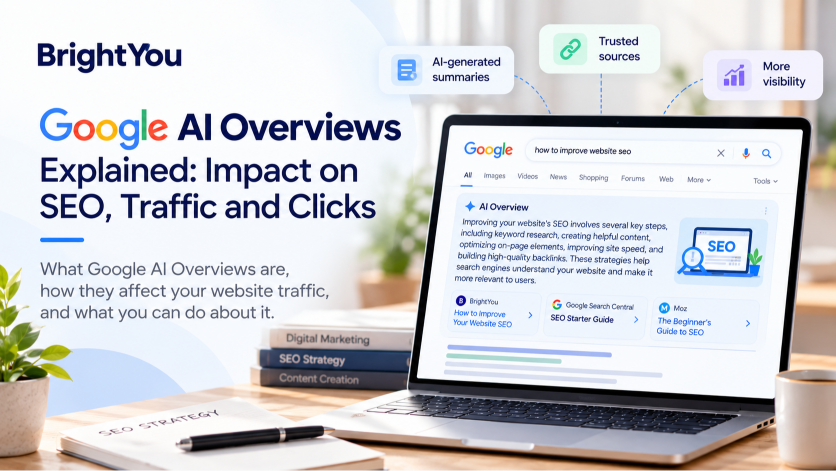

Have you noticed that Google sometimes answers your question before you even open a website? Instead of showing only a list of links, Google can display an AI-generated summary at the top of its search results.
This feature is called Google AI Overviews, and it is changing how people find and consume information online.
For bloggers, website owners, and digital marketers, this brings up an important question: if Google answers questions directly in search results, what happens to website traffic?
The impact depends on the type of search, the information users need, and the links available in the results. Some people may find everything they need in the summary, while others may visit websites to explore a topic in greater detail.
In this article, we’ll look at how Google AI Overviews work, how they can affect organic traffic, and what website owners can do to understand and respond to these changes.
What Are Google AI Overviews?

Google AI Overviews are AI-generated summaries that appear in Google Search for certain queries. They combine information from relevant sources to help users understand a topic without having to open several websites individually.
For example, imagine someone searches for “how to improve website SEO.” Google may display a summary covering keyword research, technical SEO, content quality, and internal linking. Links to relevant websites may appear alongside the summary, allowing users to explore particular recommendations in more detail.
Google uses its Gemini AI models and search systems to generate these overviews. The feature is designed to help people find information, particularly when a question involves several related ideas.
You can learn more from Google’s official guide to AI features and your website.
Google AI Overviews vs. Google AI Mode
Although these features both use artificial intelligence, they serve different purposes.
- Google AI Overviews: Provide an AI-generated summary within the search results page.
- Google AI Mode: Offers a more conversational search experience where users can explore complex questions and ask follow-up queries.
Understanding this difference is useful when planning your SEO strategy. AI Overviews are a feature within Google Search, not a replacement for the entire search experience.
How Do Google AI Overviews Affect SEO?
AI Overviews change how users interact with search results. However, their impact isn’t the same for every website or keyword.
Here are three important ways they can affect organic search performance.
1. They Can Reduce Clicks for Some Searches
Imagine someone searches for “what is a meta description?” They may only need a short definition.
If Google’s AI Overview answers the question clearly, that person might not need to visit another website. This is an example of a zero-click search, where a user finds an answer without clicking through to an external page.
For websites that depend on informational traffic, this can be a concern. A page may continue appearing in search results but receive fewer clicks than expected.
However, more detailed searches can lead to different behaviour. Someone looking for instructions on setting up Google Tag Manager, for example, may still need screenshots, step-by-step guidance, and troubleshooting advice.
What this means for website owners: Don’t stop creating informational content. Instead, make sure your articles provide enough detail and practical value to help readers go beyond a quick summary.
2. Search Visibility Is Not Just About Rankings
Traditional SEO often focuses on where a page ranks in Google’s search results. Rankings remain important, but AI-generated summaries introduce another way for users to discover information.
When Google includes a website as a source in an AI Overview, users may encounter that brand even if they don’t click immediately.
This can create an additional opportunity for discovery, although visibility does not automatically translate into more traffic or conversions.
It’s worth considering several metrics together, including impressions, clicks, CTR, and the queries that bring users to your website.
3. Informational and Commercial Searches Can Behave Differently
Not every search has the same purpose.
Someone searching for “what is Google Analytics 4?” may want a basic explanation. Another person searching for “best analytics tools for a small business” may be comparing different products before making a decision.
AI Overviews can appear for different kinds of queries, and the search experience may vary depending on the question.
For businesses, this makes understanding search intent particularly important. Consider what users want to learn, compare, or accomplish before deciding what information your page should provide.
How Can Website Owners Respond to AI Overviews?
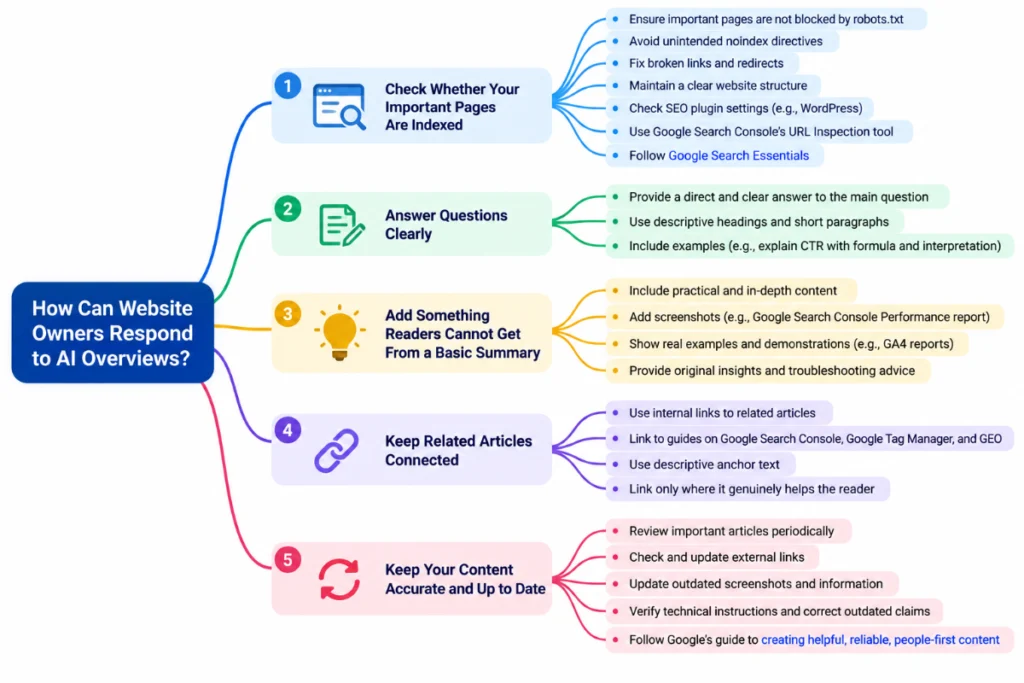
There is no guaranteed technique for making a website appear in an AI Overview. Google’s guidance continues to emphasize established SEO practices, helpful content, and technical accessibility.
Rather than trying to find a shortcut, focus on the parts of your website you can improve.
1. Check Whether Your Important Pages Are Indexed
Start with the basics. Google needs to be able to access and process your content for it to be considered for search visibility.
Check that important pages aren’t accidentally blocked by robots.txt or marked with an unintended noindex directive.
You should also review broken links, redirects, and your website’s internal structure.
If you use WordPress, make sure your SEO plugin settings allow important posts to be indexed. You can use Google Search Console’s URL Inspection tool to review individual URLs.
For further guidance, see Google Search Essentials.
2. Answer Questions Clearly
When someone visits your article, they should be able to understand the main point without searching through several paragraphs.
Use descriptive headings, short paragraphs, and examples that explain unfamiliar concepts.
For example, if you’re writing about click-through rate, explain what CTR means, show the formula, and demonstrate how a website owner might interpret the result.
Clear explanations make your article more useful to readers. They don’t guarantee an AI Overview citation, but they help establish a strong foundation for helpful content.
3. Add Something Readers Cannot Get From a Basic Summary
A short AI-generated answer may explain a concept, but readers often need help applying it.
This is where practical content becomes valuable.
If you’re writing a Google Search Console tutorial, include screenshots of the Performance report and explain how to interpret impressions, clicks, CTR, and average position.
If you’re writing about GA4, show readers where to find a report and what they can learn from the data.
Original examples, real demonstrations, and clear troubleshooting advice can give readers a reason to visit your website rather than relying only on a summary.
4. Keep Related Articles Connected
Internal links help readers move between related topics on your website.
For example, an article about Google AI Overviews can link to your existing guides on Google Search Console, Google Tag Manager, and Generative Engine Optimization (GEO).
This allows readers to explore related subjects while helping search engines understand the relationship between your pages.
Use descriptive anchor text and link only where the additional article genuinely helps the reader.
5. Keep Your Content Accurate and Up to Date
Search features and SEO guidance can change over time. An article that was accurate a year ago may need updating if a tool, feature, or recommendation has changed.
Review important articles periodically. Check external links, update outdated screenshots, verify technical instructions, and correct claims that are no longer accurate.
Google’s guide to creating helpful, reliable, people-first content is a useful reference when reviewing the quality of your website’s content.
How to Measure the Impact of AI Overviews
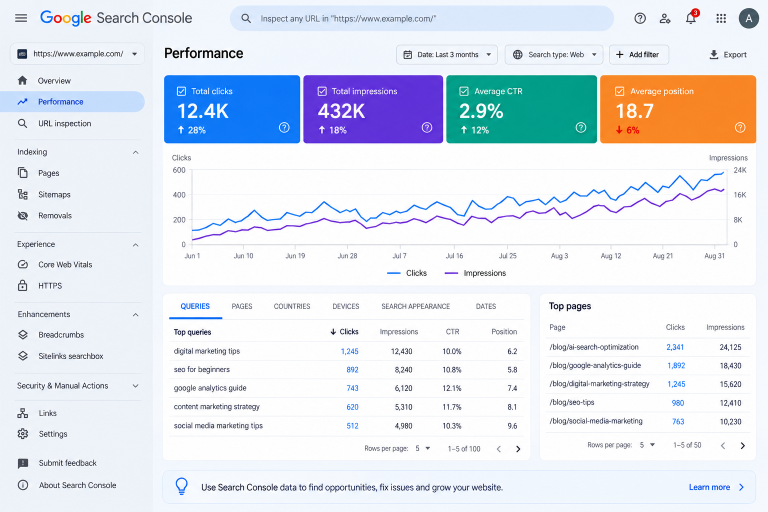
One of the biggest challenges for website owners is determining whether changes in search behaviour are affecting their traffic.
Google Search Console is a useful starting point because it shows how your website performs in Google Search.
Impressions
Impressions indicate how often your website appeared in Google Search results.
If impressions increase, your content may be gaining visibility for existing or new queries. However, impressions alone don’t tell you whether that visibility is attracting the right audience.
Clicks
Clicks show how many times users selected your website from Google Search.
Compare clicks over time and look at individual pages to identify which articles are gaining visitors and which may need further attention.
Click-Through Rate (CTR)
CTR is the percentage of impressions that result in clicks.
You can calculate it using this formula:
CTR = (Clicks ÷ Impressions) × 100
For example, if a page receives 100 impressions and 5 clicks, its CTR is 5%.
A decline in CTR may be worth investigating, but it doesn’t automatically mean AI Overviews are responsible. Ranking changes, search intent, competition, and other search features can also influence clicks.
Average Position
Average position gives you an aggregated view of where your website’s results appeared during a selected period.
Review it alongside clicks, impressions, CTR, and search queries. Looking at these metrics together provides a more useful picture than focusing on one number alone.
You can find these metrics in Google’s Search Console Performance report.
Can Google Search Console Track AI Overview Traffic Separately?
Google Search Console does not currently provide a dedicated report that isolates all AI Overview clicks and impressions from other Google Search activity.
Its Performance report groups eligible activity under the broader Web search reporting category.
Some third-party SEO tools offer features for monitoring search queries that trigger AI Overviews and identifying domains cited in those results. Their coverage and capabilities vary, so treat their reports as additional insights rather than a complete record of AI-driven traffic.
For smaller websites, the most practical starting point is to monitor Search Console regularly, compare performance over time, and investigate meaningful changes.
What About E-Commerce Websites?
AI-powered search can also affect how people discover products and compare their options.
If you manage an online store, accurate product information is essential.
Make sure your product titles, descriptions, prices, availability, and images are up to date. If your business uses Google Merchant Center, maintain your product feed and address data-quality issues.
You should also provide useful product descriptions that explain features, intended use, and important differences between products.
For example, someone looking for a laptop for graphic design may want to compare memory, display quality, processing power, and price. A product page that clearly explains these details is more useful than one filled with vague promotional language.
Google may display product information in relevant AI-powered search experiences, but product visibility depends on Google’s systems and eligibility requirements. Following best practices does not guarantee a particular placement.
Common Mistakes to Avoid
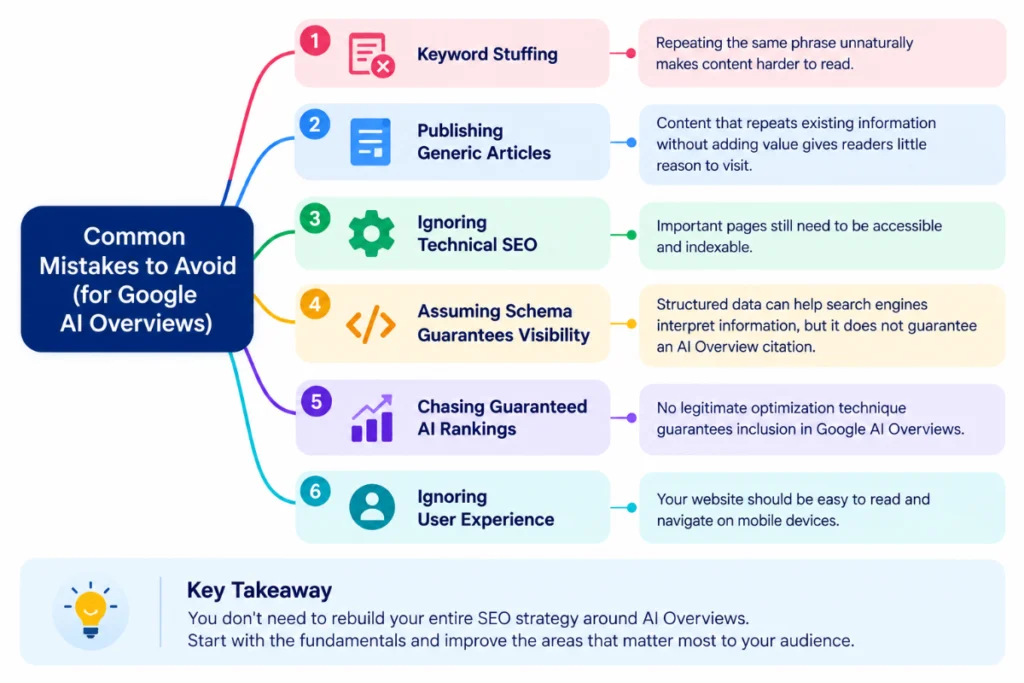
When search technology changes, it’s tempting to look for quick fixes. However, some approaches can distract you from improving your website.
- Keyword stuffing: Repeating the same phrase unnaturally makes content harder to read.
- Publishing generic articles: Content that repeats existing information without adding value gives readers little reason to visit.
- Ignoring technical SEO: Important pages still need to be accessible and indexable.
- Assuming schema guarantees visibility: Structured data can help search engines interpret information, but it does not guarantee an AI Overview citation.
- Chasing guaranteed AI rankings: No legitimate optimization technique guarantees inclusion.
- Ignoring user experience: Your website should remain easy to read and navigate on mobile devices.
You don’t need to rebuild your entire SEO strategy around AI Overviews. Start with the fundamentals and improve the areas that matter most to your audience.
Frequently Asked Questions
1. Do Google AI Overviews affect organic traffic?
They can affect organic clicks for some queries, particularly when a summary answers a user’s question directly. The impact varies by topic, query, and search result. Monitor your own website’s performance rather than assuming every page will experience the same change.
2. Can a new website appear in Google AI Overviews?
A new website can be considered if its pages are accessible and eligible to appear in Google Search. However, inclusion is not guaranteed. Focus on useful content, technical accessibility, and a clear website structure.
3. Does AI-generated content affect SEO?
Using AI to assist with writing does not automatically make content ineligible to rank. What matters is whether the content is helpful, reliable, and created for users. Publishing large quantities of low-value content primarily to manipulate rankings can violate Google’s spam policies.
4. Can I optimize my website specifically for AI Overviews?
There is no separate technique that guarantees inclusion. Google’s guidance emphasizes established SEO practices, helpful content, and technical accessibility. These are sensible areas to focus on when improving your website.
5. Will AI Overviews replace traditional SEO?
Traditional SEO remains important because search engines still need to access, interpret, and evaluate web content. As search evolves, website owners should continue creating useful content, maintaining their websites, and adapting their measurement strategies.
Final Thoughts
Google AI Overviews are changing how people discover information, but that doesn’t mean website owners should abandon SEO.
Instead, pay attention to how people search and what they need from your content. Some questions require only a short explanation, while others call for detailed instructions, original examples, and practical advice.
Review your existing articles, improve sections that need more clarity, and use Google Search Console to understand how your pages perform.
You don’t have to make every change at once. Start with one article, identify an opportunity for improvement, and measure the results over time.
At BrightYou, the goal is to make digital marketing easier to understand and help businesses make better decisions online. Keeping up with changes in search is part of that process, but creating genuinely useful content remains a sensible place to start.
Want to learn more about optimizing your website for AI-powered search? Check out our post on Generative Engine Optimization (GEO) for practical tips on improving your website’s visibility across AI search platforms.