
AI has changed the way digital marketers work.
Not long ago, creating a blog meant opening a blank document, researching the topic, building an outline, and spending hours trying to turn ideas into something useful. Designing a campaign could mean jumping between a keyword tool, a spreadsheet, Canva, an ad platform, and several rounds of revisions.
Today, AI can help with many of those tasks.
But there is a catch.
AI can make marketing work faster. It cannot automatically make it better.
That difference becomes obvious when you compare two pieces of AI-generated content. One sounds generic and could belong to any business. The other understands the audience, reflects the brand’s personality, answers a real customer question, and has a clear purpose.
The difference is rarely the AI tool alone.
It is usually the marketer behind the prompt.
For small businesses, freelancers, and students learning digital marketing, this is where AI becomes genuinely interesting. You don’t need to hand over your entire marketing strategy to AI. You need to learn where it can save time, where human judgment matters, and how to give it enough context to produce something worth using.
AI in Digital Marketing Is More Than Writing Blog Posts
When people hear “AI marketing,” they often think about generating blog posts or Instagram captions.
That’s only a small part of it.
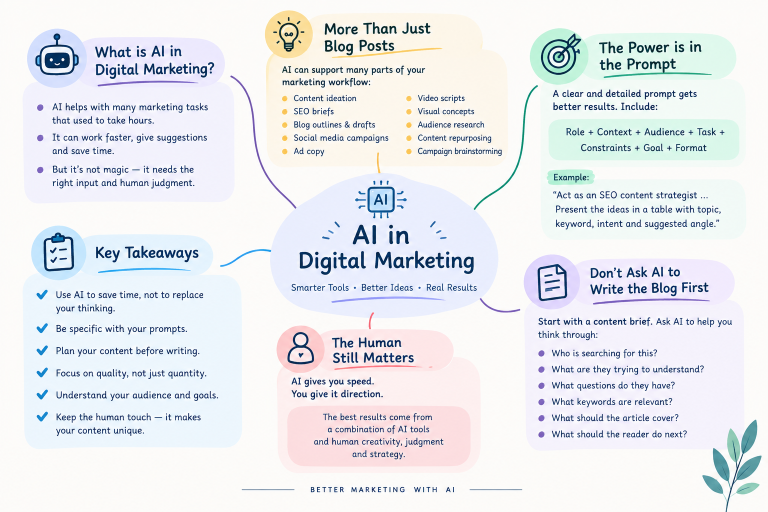
AI can now support many stages of a digital marketing workflow, including:
- Content ideation and planning
- SEO content briefs
- Blog outlines and drafts
- Social media campaigns
- Advertising copy
- Video scripts
- Visual concepts
- Audience research
- Content repurposing
- Campaign brainstorming
For a small business, this can be particularly useful.
Imagine a salon owner in Kerala wants to promote a monsoon hair-care service. Instead of starting from scratch for every platform, AI can help turn that one business idea into a blog topic, Instagram carousel, Reel concept, ad variations, and Story content.
The strategy still comes from the business.
AI simply helps move the idea forward.
That distinction is important.
The Quality of Your AI Output Starts With the Quality of Your Prompt
One of the first things marketers notice when they start using AI is how unpredictable the output can feel.
Ask:
Write an Instagram post for a salon.
You’ll probably get something usable, but generic.
Now give the AI some actual marketing context:
Act as a social media copywriter for a women’s salon in Kerala. The audience is women aged 20–40 who want practical hair-care solutions during the monsoon. Write an Instagram post promoting a hair-care treatment. Keep it under 80 words, use a conversational tone, start with a strong hook, highlight one customer benefit, and end with a booking CTA. Avoid exaggerated claims.
The difference is obvious.
The second prompt tells the AI who it is writing for, what the business is selling, what the content should achieve, and how the result should sound.
This is the practical side of prompt engineering.
OpenAI’s prompt engineering guide also recommends giving models clear instructions and useful context.
A simple framework for better marketing prompts
You don’t need complicated formulas. A useful structure is:
Role + Context + Audience + Task + Constraints + Goal + Format
For example:
Act as an SEO content strategist.
The business is a small digital marketing agency in Kerala.
The audience is small business owners who are new to digital marketing.
Create five blog ideas around local SEO.
Use simple language and avoid unnecessary technical terms.
Focus on practical search intent.
Present the ideas in a table with the topic, keyword, intent, and suggested angle.
That is already enough to produce a much more focused starting point.
Best for · Students, freelancers and small-business marketers
Don’t Ask AI to Write the Blog First
This is one of the biggest mistakes beginners make.
They choose a topic, open ChatGPT, and immediately type:
Write a 1,500-word SEO blog.
The result may look impressive at first glance. But often, something is missing.
There is no clear search intent. The headings are predictable. The examples are generic. The article may answer the topic without really helping the reader.
A better workflow starts with a content brief.
Ask AI to help you think through:
- Who is searching for this?
- What are they trying to understand?
- What questions do they have?
- What keywords are relevant?
- What should the article cover?
- What should the reader do next?
For example:
Create an SEO content brief for “digital marketing for small businesses in Kerala.” Identify the primary keyword, related keywords, long-tail queries, search intent, suggested H1/H2/H3 structure, FAQs, internal linking opportunities and CTA.
Then bring in actual keyword and search data to validate the ideas.
AI is good at organising possibilities. It should not be treated as the final source of truth for search demand.
For SEO fundamentals, Google’s SEO Starter Guide is a useful reference.
One Good Idea Can Become an Entire Campaign
This is where AI becomes much more useful than simply generating individual posts.
Let’s take a realistic example.
A small salon wants to promote a monsoon hair-care service.
The campaign could begin with one customer problem:
“Why does my hair become so difficult to manage during the monsoon?”
From that one idea, you could develop:
| Channel | Content idea |
|---|---|
| Blog | 5 Common Monsoon Hair Problems |
| Instagram Carousel | Is the Monsoon Ruining Your Hair? |
| Reel | 3 Hair-Care Mistakes to Avoid |
| Google Ads | Monsoon Hair Care Near You |
| Story | Quick hair-care tip + booking CTA |
| Visual | Rainy-season hair-care campaign image |
AI can help develop the first draft of each asset.
But there’s an important advantage here: the campaign stays connected.
The same audience problem appears across different formats instead of publishing six unrelated pieces of content.
That is much closer to how an experienced marketer thinks about content.
AI Can Help With Ads — But Don’t Let It Become Your Ad Strategist
Advertising is another area where AI is useful for generating variations.
Suppose a dental clinic wants to advertise a consultation service.
Instead of asking:
Write Google Ads for a dental clinic.
Give it the actual campaign context:
Create 10 Google Search ad headlines and 4 descriptions for a dental clinic in Kochi targeting people searching for dental consultation. Keep the language professional and benefit-focused. Avoid unsupported medical claims. Make the copy suitable for high-intent searchers.
Now you have multiple starting points to evaluate.
You can ask AI to explore different angles:
- Convenience
- Location
- Service benefits
- Customer concerns
- Trust
- Booking intent
Google also explains its use of AI in advertising through AI Essentials for Google Ads.
But don’t confuse more variations with better advertising.
A hundred headlines don’t automatically create a good campaign.
You still need to understand the audience, offer, landing page, budget, targeting, and actual campaign performance.
The Visual Side of AI Is Becoming Just as Important
AI isn’t only changing how marketers write.
It is changing how they develop visual ideas.
A common problem with AI-generated visuals is that marketers ask for the finished image too early.
For example:
Create a poster for a Kerala restaurant.
That’s not really a creative brief.
A better direction would be:
Create a premium social media visual concept for a Kerala vegetarian restaurant. Show an authentic traditional meal served on a banana leaf on a clean wooden table. Use natural daylight, minimal background elements and an editorial food-photography style. Leave negative space on the left for promotional text. The visual should feel authentic, warm and premium rather than artificial.
Now the tool has something to work with.
The same approach can be used for:
- Social media creatives
- Website banners
- Product visuals
- Infographics
- Campaign posters
- Thumbnail concepts
- Brand exploration
- Motion graphics
Tools such as Canva Magic Studio can also support AI-assisted creative workflows.
The important thing is not simply generating a pretty image.
The visual needs to communicate something.
What About AI-Generated Logos?
AI can be useful when exploring early branding ideas.
Imagine a new photography business wants a minimalist identity.
Instead of asking:
Create a photography logo.
You could describe the creative direction:
Develop three minimalist logo concepts for a modern photography brand. Explore a simple geometric symbol inspired by a camera, combined with a clean wordmark. The concept should work in black and white and remain recognizable at small sizes. Avoid detailed camera illustrations.
That gives you something to discuss and refine.
However, AI-generated logo concepts should not automatically be treated as final brand assets. Businesses still need to consider originality, typography, trademarks, scalability, and whether the design genuinely fits the brand.
AI is excellent for exploration.
Final brand decisions still require human judgment.
AI Can Turn a Simple Idea Into a Video Plan
Short-form video has made content production more demanding.
A marketer may need a hook, script, shot list, on-screen text, voiceover and CTA — all for a video that lasts less than a minute.
AI can help organise that process.
For example:
Create a 30-second Instagram Reel for a Kerala café introducing a new breakfast menu. The audience is college students and young professionals. Start with a strong three-second hook. Include suggested camera shots, on-screen text, voiceover and a final CTA. Keep the language natural rather than promotional.
Instead of receiving only a paragraph, you can ask for:
Hook → Scene → Visual → Voiceover → On-screen text → CTA
That turns an idea into something a creator can actually produce.
The same approach can work for product demonstrations, educational Reels, service explainers and local-business campaigns.
The Biggest Advantage May Be Content Repurposing
Here’s a simple workflow worth trying.
Suppose you’ve already published a detailed blog.
Don’t immediately move on to the next topic.
Ask AI to identify:
- 3 Reel ideas
- 5 Instagram posts
- 1 carousel
- 5 Story ideas
- 3 short video hooks
- 2 email ideas
- 5 FAQ questions
Then review the suggestions and select only the ideas that make sense for your audience.
This can turn one strong piece of content into several smaller assets.
It also makes your content strategy more consistent.
The goal isn’t to publish the same paragraph everywhere.
It is to take the same useful idea and adapt it to how people consume content on different platforms.
Where AI Still Needs a Human Marketer
This is the part that is easy to overlook.
AI can produce a polished paragraph in seconds. That doesn’t mean the paragraph is right.
It can:
- Get facts wrong
- Invent information
- Use generic examples
- Repeat familiar phrases
- Miss local context
- Misunderstand the target audience
- Make unsupported claims
- Produce content that sounds similar to thousands of other websites
This is especially important for businesses.
If a local business gives AI little information and then publishes everything without review, the result can sound strangely disconnected from the actual business.
An experienced marketer does something different.
They add:
Real customer questions.
Real business experience.
Local context.
Brand personality.
Actual product knowledge.
That’s what makes the final content feel human.
AI Marketing vs Traditional Marketing: What Really Changes?
AI doesn’t completely replace the traditional marketing workflow.
It changes the amount of time spent on certain tasks.
| Traditional workflow | AI-assisted workflow |
|---|---|
| Brainstorm ideas manually | Generate several starting points |
| Write every caption from scratch | Generate variations and refine them |
| Start visual design from zero | Develop creative directions first |
| Write video scripts manually | Generate scripts and shot lists |
| Build every content brief manually | Create a structured first draft |
| Repurpose content one platform at a time | Adapt one idea into multiple formats |
The important word is assisted.
AI can speed up production, but strategy still belongs to the marketer.
What Are the Most Common AI Marketing Mistakes?
Publishing the first AI draft
The first output should usually be treated as a starting point, not the finished article.
Giving AI almost no context
If you don’t tell AI about your audience and business, don’t be surprised when the result sounds generic.
Using AI-generated facts without checking them
Always verify important claims, statistics, dates and sources.
Creating content just because AI makes it easy
More content isn’t necessarily better content.
Making every brand sound the same
A local café shouldn’t sound like a software company. A salon shouldn’t sound like a financial institution.
Using AI without measuring results
Marketing decisions should eventually come back to real data: traffic, engagement, leads, conversions and sales.
A Practical AI Workflow You Can Start Today
You don’t need a collection of expensive AI tools to begin.
Start with one marketing problem.
If you’re a small business owner, it could be:
“I don’t know what to post on Instagram.”
Instead of asking AI for 30 random posts, give it your business context and customer profile.
Then:
1. Define the goal
Do you want awareness, traffic, enquiries or sales?
2. Describe your customer
Who are you trying to reach?
3. Give AI the business context
Explain your location, services, products, pricing or offer where relevant.
4. Build the prompt
Add the role, task, constraints and desired format.
5. Generate several ideas
Don’t settle for the first answer.
6. Add your own experience
Replace generic examples with real ones.
7. Fact-check and edit
Make sure the final content is accurate and sounds like your brand.
8. Publish and measure
Look at what people actually respond to.
9. Improve the next prompt
Your campaign results can teach you what to ask AI for next time.
That final step is often overlooked.
Good AI use gets better with feedback.
Frequently Asked Questions
Is AI useful for beginners in digital marketing?
Yes. Beginners can use AI for brainstorming, content planning, SEO briefs, social media ideas, ad copy, video scripts and creative concepts. However, understanding basic marketing principles is still important.
Do I need coding skills to use AI for marketing?
No. Most everyday AI marketing tasks can be done using natural-language instructions. You don’t need programming knowledge to create prompts, content ideas or campaign concepts.
Can AI create an entire marketing campaign?
AI can help develop campaign ideas, content, advertising variations, scripts and visual concepts. But the overall strategy, positioning, budget and final decisions should remain with the marketer or business owner.
Is AI-generated content good for SEO?
AI-generated content can be useful, but using AI alone does not guarantee search visibility. Content still needs to be accurate, helpful, relevant, original in value and created for people first.
Google also provides guidance about how websites can appear in AI-powered search experiences through its documentation on AI features and your website.
Can small businesses use AI without a marketing team?
Yes. A small business can use AI to assist with planning, content creation, creative concepts and other repetitive marketing tasks. The key is to start with one specific problem rather than trying to automate everything at once.
Final Takeaway: The Best AI Marketers Know When Not to Use AI
AI has made it easier to produce content.
But producing content was never the hardest part of marketing.
Understanding people is.
A good marketer knows what a customer is worried about, what information they need, what makes them trust a business, and what might convince them to take the next step.
AI can help turn those insights into content much faster.
It can help you move from a blank page to a campaign idea, from a campaign idea to a script, and from one blog post to an entire content series.
But don’t hand your marketing strategy over to a chatbot.
Use AI for speed. Use human experience for judgment. Use real data to decide what works.
That combination is where AI becomes genuinely powerful for digital marketing.