
If you’ve ever opened Google Search Console and wondered what all those numbers actually mean, you’re not alone.
You might see thousands of impressions but only a few hundred clicks. Then there are metrics like CTR and average position, which can make the Performance report even more confusing.
The good news is that these metrics are easier to understand once you know what they are actually telling you.
Instead of looking at each number separately, you can use them together to understand how your website is performing in Google Search, which queries are bringing visibility, and where you may have opportunities to improve.
In this guide, we’ll explain the four main Google Search Console metrics:
- Impressions
- Clicks
- Click-through rate (CTR)
- Average position
We’ll also look at how to interpret these metrics and turn the data into practical SEO insights.
What Is Google Search Console?
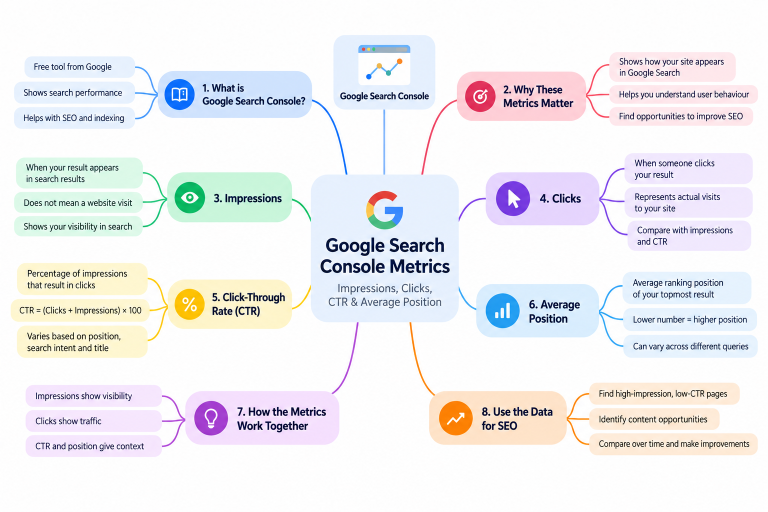
Google Search Console (GSC) is a free tool from Google that helps website owners monitor their website’s performance in Google Search.
It can provide information about:
- Search queries
- Impressions
- Clicks
- Click-through rate
- Average position
- Indexing
- Search appearance
- Technical issues
If you’re working on SEO, Search Console can help answer questions such as:
Which searches are showing my website?
Which pages are receiving clicks?
How often are my pages appearing in search results?
Are people clicking when they see my pages?
The Performance report is particularly useful for answering these questions.
For more information about setting up and using Search Console, you can visit Google Search Console.
The Four Main Google Search Console Metrics
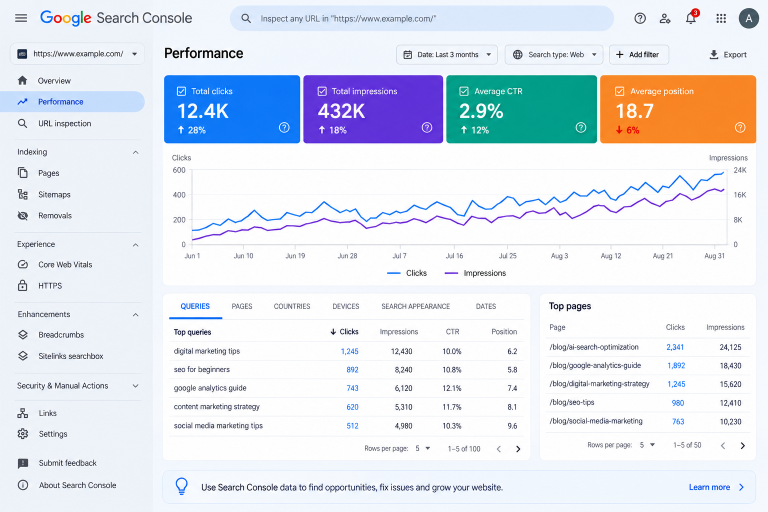
Let’s start with the four metrics you’ll see most often in the Performance report.
1. Impressions
An impression is recorded when a link to your website is shown in Google’s search results.
For example, imagine someone searches for:
“best digital marketing strategies for small businesses”
If one of your pages appears in the search results, that appearance can count as an impression.
But there’s an important point to remember:
An impression does not mean someone visited your website.
Your page could appear 1,000 times and receive only 30 clicks.
In that situation:
- Impressions: 1,000
- Clicks: 30
Your page is getting visibility, but only some of those impressions are turning into visits from Google Search.
What Do High Impressions Mean?
High impressions can indicate that your pages are appearing for a significant number of searches.
However, high impressions don’t automatically mean your SEO is successful.
You also need to look at:
- Clicks
- CTR
- Average position
- Search queries
- Search intent
For example, a page might receive a lot of impressions because it appears for many related searches, but if most of those appearances are at lower positions, the number of clicks may remain relatively small.
What Do Low Impressions Mean?
Low impressions can mean that your page isn’t appearing frequently in search results.
There can be several reasons for this:
- The page is relatively new
- The topic has limited search demand
- The page isn’t ranking for many relevant searches
- Keyword targeting needs improvement
- The content needs stronger topical coverage
Low impressions don’t automatically mean the content is poor. It’s better to first check which queries the page is appearing for and where it is ranking.
2. Clicks
A click is recorded when someone clicks your website’s search result.
For example, suppose your page receives:
- 2,000 impressions
- 100 clicks
Those 100 clicks represent visits generated from those search results.
Clicks are important because they show that people are actually choosing your result and visiting your website.
But clicks alone don’t tell you the whole story.
A page may receive more clicks because it appears for more searches, while another page may receive fewer impressions but have a higher CTR.
That’s why clicks are more useful when you look at them alongside impressions, CTR, and position.
What Should You Look For?
When analysing clicks, ask:
- Which pages receive the most clicks?
- Which search queries generate those clicks?
- Are clicks increasing over time?
- Are impressions increasing faster than clicks?
- Which pages have high visibility but few clicks?
These questions can reveal much more than simply looking at your total number of clicks.
3. Click-Through Rate (CTR)
Click-through rate (CTR) shows the percentage of impressions that resulted in clicks.
The basic formula is:
CTR = (Clicks ÷ Impressions) × 100
For example, if your page receives:
- 1,000 impressions
- 50 clicks
Then:
CTR = (50 ÷ 1,000) × 100 = 5%
So the CTR is 5%.
Why Does CTR Matter?
CTR helps you understand how often people click your search result after seeing it.
However, don’t treat CTR as a universal score.
CTR can vary depending on:
- Search position
- Search intent
- Query type
- Competition
- Page title
- Search snippet
- Search features
- Brand recognition
For example, a result appearing near the top of the search results generally has more opportunity to receive clicks than one appearing much further down.
So if you see a low CTR, don’t immediately assume something is wrong.
First ask:
What queries are generating these impressions?
Where is the page appearing?
Does the title match what the searcher is looking for?
Is the page relevant to the query?
These questions will give you more useful information than the CTR number alone.
4. What Does Average Position Mean?
Average position is one of the most misunderstood metrics in Google Search Console.
In simple terms, it represents the average position of your site’s topmost result across the impressions included in the reported Search Console data.
It does not mean that your page appeared in exactly that position for every search.
For example, your page might appear at:
- Position 3 for one query
- Position 7 for another
- Position 12 for another
The reported average is calculated from the underlying search data.
Is a Lower Position Number Better?
Yes. When discussing search-result positions, a lower numerical position represents a higher placement.
For example:
Position 3 is higher than Position 10.
However, average position shouldn’t be treated as a complete measure of SEO performance.
A website could have a relatively strong average position but still receive limited clicks depending on the queries, search volume, search features, and other factors involved.
That’s why it’s useful to look at position, impressions, clicks, and CTR together.
How Impressions, Clicks, CTR and Position Work Together
This is where Google Search Console becomes much more useful.
Imagine you see:
| Metric | Example |
|---|---|
| Impressions | 10,000 |
| Clicks | 300 |
| CTR | 3% |
| Average position | 8 |
Instead of simply asking whether each number is “good” or “bad”, look at what the numbers are telling you.
Impressions
Your pages are appearing in Google Search regularly.
Clicks
Some of those impressions are turning into visits.
CTR
CTR tells you how frequently those impressions result in clicks.
Average position
Your topmost results are appearing around the reported average position.
Now you can investigate the data behind those numbers.
Which queries are generating impressions?
Which pages are receiving clicks?
Which queries have a low CTR?
Which pages are close to higher search positions?
That’s where the real SEO insight comes from.
What Does High Impressions but Low Clicks Mean?
One common situation is:
High impressions + low clicks
For example:
5,000 impressions
100 clicks
2% CTR
There isn’t one automatic explanation.
Your page could be:
- Ranking for many searches at lower positions
- Appearing for queries that aren’t highly relevant
- Competing with strong search results
- Using a title that doesn’t clearly match search intent
- Appearing in searches where users don’t necessarily need to click
The best next step is to investigate the queries, pages, positions, and CTR behind those impressions.
If the page is already appearing for relevant searches, improving the title and search snippet may be worth considering.
What Do Low Impressions Mean?
Low impressions generally mean that your pages aren’t appearing for many searches.
This can happen when:
- The page is new
- The topic has limited search demand
- The page has limited search visibility
- Keyword targeting doesn’t match relevant searches
- The content doesn’t yet have enough topical relevance
For a new website, low impressions can be completely normal.
SEO takes time, so it’s better to look for trends rather than judge a page based on a few days of data.
Why Search Queries Matter in Google Search Console
One of the most useful sections in Search Console is the Queries report.
It shows the search terms for which your website received impressions and clicks.
Sometimes, you’ll find queries that you weren’t specifically targeting when you originally wrote the article.
For example, you might publish an article targeting:
“social media marketing tips”
But Search Console could show that the page is also appearing for searches such as:
- Social media content ideas
- Small business social media tips
- Social media marketing strategy
- Instagram marketing tips
These queries can give you useful ideas for improving your content.
You could:
- Add a relevant section to the existing article
- Create a supporting article
- Improve internal linking
- Expand an existing topic
- Identify a new content opportunity
This is particularly useful when building a topical content strategy.
You can also explore BrightYou’s digital marketing resources for more practical guides.
Why Average Position Can Be Misleading
Average position is useful, but it can sometimes create the wrong impression if you look at it without context.
Different Queries Have Different Positions
Suppose one page ranks:
- Position 2 for one query
- Position 8 for another
- Position 20 for another
The overall average doesn’t show you everything that is happening.
Looking at individual queries can give you a much clearer picture.
New Queries Can Change the Average
As Google starts showing your page for additional searches, those new impressions can affect the average position.
That doesn’t necessarily mean the page suddenly became worse.
Branded Searches Can Influence the Data
If users search specifically for your brand, your website may appear prominently.
Those searches can influence your overall data.
This is another reason to examine your queries and pages rather than relying only on the website-wide average.
Search Features Can Affect CTR
Google Search results aren’t limited to traditional blue links.
Depending on the search, users may see features such as:
- Images
- Videos
- Featured snippets
- Other search-result elements
These features can affect how people interact with search results.
For example, someone might find the information they need directly in a search result without clicking through to a website.
So a lower CTR doesn’t automatically mean that your page has a problem.
The type of search result and the searcher’s intent matter too.
How to Use Google Search Console Metrics for SEO
Understanding the numbers is useful, but the real value comes from using them to make better decisions.
1. Find Pages With High Impressions and Low CTR
Look for pages that receive a significant number of impressions but relatively few clicks.
Then check:
- Which queries generate the impressions?
- What is the average position?
- Does the title match the search intent?
- Is the page relevant to those searches?
If the page is already appearing for relevant searches, improving the title and search snippet may help attract more clicks.
2. Find Queries Where You’re Already Visible
Review the queries that generate impressions.
You may find relevant searches that you didn’t specifically target when writing the article.
These can become opportunities for:
- Content improvements
- New supporting articles
- Internal links
- FAQ sections
- Content clusters
3. Analyse Individual Pages
Don’t only look at your website’s overall performance.
Open the Pages report and see which individual pages are generating:
- Impressions
- Clicks
- CTR
- Search visibility
This can help you identify which content is gaining traction and which pages may need more attention.
4. Compare Different Time Periods
SEO performance makes more sense when you compare time periods.
For example:
Last 28 days vs previous 28 days
You can compare:
- Clicks
- Impressions
- CTR
- Average position
You can also compare longer periods when you have enough historical data.
The goal isn’t to worry about every daily fluctuation. Look for meaningful changes over time.
Google Search Console vs Google Analytics
Google Search Console and Google Analytics 4 are both useful, but they answer different questions.
Google Search Console
Search Console mainly helps you understand what happens in Google Search before users reach your website.
It can show:
- Search queries
- Impressions
- Clicks
- CTR
- Search position
Google Analytics 4
GA4 helps you understand what happens after users arrive on your website.
You can use it to analyse:
- User activity
- Engagement
- Pages visited
- Events
- Conversions
A simple way to think about it is:
Google Search → Search Console → Website → GA4
Using both tools together can give you a more complete picture of your website’s performance.
For official information about Search Console and search performance, see Google Search Central and Google Search Console Help.
A Simple Monthly Google Search Console Check
You don’t need to spend hours inside Search Console every day.
For a small website, a simple monthly review can be a good starting point.
Step 1: Check overall performance
Look at:
- Clicks
- Impressions
- CTR
- Average position
Step 2: Check your top pages
Find the pages generating the most clicks and impressions.
Step 3: Review search queries
Look for relevant queries bringing visibility to your pages.
Step 4: Find opportunities
Pay attention to:
- High impressions with relatively low CTR
- Relevant queries where your pages are already visible
- Pages showing positive growth
- Queries that suggest new content ideas
Step 5: Make focused improvements
Don’t change everything at once.
Choose a few relevant opportunities and make focused improvements.
Step 6: Give the changes time
SEO changes need time before you can meaningfully evaluate their effect.
Google Search Console Metrics: A Practical Example
Let’s say you published a blog post three months ago.
Initially, Search Console shows:
15,000 impressions
180 clicks
1.2% CTR
Average position: 11
You then improve the article’s content, internal links, title, and alignment with search intent.
Later, you see:
18,000 impressions
420 clicks
2.3% CTR
Average position: 7
Instead of simply saying, “My traffic increased,” you can investigate what changed.
- Did the page start ranking for more relevant queries?
- Did its average position improve?
- Did CTR increase?
- Which queries contributed to the additional clicks?
- Which page changes may have helped?
This type of analysis is much more useful for SEO than looking at one metric in isolation.
How to Track Your Search Console Data
If you’re actively working on SEO, you can record important metrics in a simple spreadsheet or dashboard.
For example:
| Month | Clicks | Impressions | CTR | Average Position |
|---|---|---|---|---|
| Month 1 | 180 | 15,000 | 1.2% | 11 |
| Month 2 | 250 | 16,500 | 1.5% | 9 |
| Month 3 | 420 | 18,000 | 2.3% | 7 |
Tracking the data over time makes it easier to spot trends.
For larger websites, dashboards and automated reporting can make this process more efficient.
Don’t Chase a “Perfect” CTR or Position
It’s tempting to search for one number and decide whether your website is performing well.
But SEO doesn’t work that simply.
There is no single CTR that every website should achieve.
The same applies to average position.
A local business, an e-commerce store, a news website, and a digital marketing blog can all have very different search behaviour.
Instead of asking:
“Is my CTR good?”
ask:
“Is my CTR improving for the queries and pages that matter to my website?”
And instead of asking:
“Is my average position good?”
ask:
“Which pages and queries are moving, and are those changes bringing relevant traffic?”
That shift in thinking makes Search Console data much more useful.
Final Thoughts
Google Search Console metrics may seem complicated at first, but the basic concepts are straightforward.
Impressions tell you how often your search results appeared.
Clicks tell you how many people clicked through to your website.
CTR shows the relationship between impressions and clicks.
Average position gives you context about where your topmost search results appeared across the reported data.
But the real value comes from looking at these metrics together.
A rise in impressions might mean your content is appearing for more searches. A low CTR might give you a reason to investigate your title, search intent, or ranking position. A change in average position may make more sense once you look at the individual queries behind it.
So don’t just check your Search Console numbers.
Read the story behind them.
That’s where the useful SEO insights are.
For more practical guides on SEO, digital marketing, content strategy, Google Analytics, and website growth, visit BrightYou.