
A website can look professional, contain useful information, and still struggle to appear in Google search results. Sometimes, the problem is technical. In other cases, important pages are difficult to find, content does not match what people are searching for, or the website needs better optimization.
This is where an SEO audit becomes useful.
An SEO audit helps you understand how well your website is optimized for search engines and visitors. It allows you to identify issues, discover opportunities, and decide which improvements deserve your attention first.
You do not need an expensive collection of tools to get started. With a clear process and a few free tools, you can review your website’s SEO health and create a practical plan for improvement.
In this guide, you will learn how to conduct an SEO audit step by step, covering technical SEO, on-page optimization, website performance, content quality, backlinks, and AI search visibility.
What Is an SEO Audit?
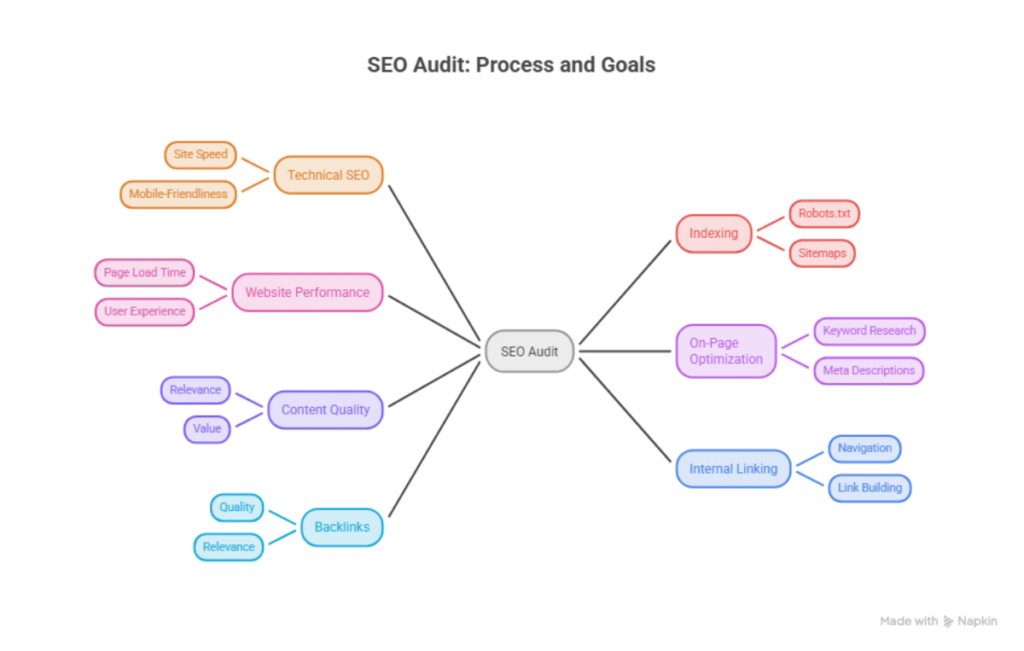
An SEO audit is a systematic review of a website to identify issues that may affect its visibility in search engines, its ability to be crawled and indexed, and the experience it provides to visitors.
Think of it as a health check for your website. Instead of making random changes and hoping for better rankings, you examine how your website works, identify problems, and prioritize improvements.
A typical SEO audit covers several areas:
- Technical SEO: Crawling, indexing, redirects, canonical tags, and website accessibility.
- On-page SEO: Title tags, meta descriptions, headings, images, URLs, and internal links.
- Content quality: Relevance, usefulness, search intent, and opportunities to improve existing pages.
- Off-page SEO: Backlinks, referring domains, and external link quality.
- Website performance: Loading speed, Core Web Vitals, and mobile experience.
- Search visibility: Search queries, impressions, clicks, and page performance.
An SEO audit cannot guarantee higher rankings. Its purpose is to help you identify problems, improve your website, and make informed decisions about your SEO strategy.
When Should You Conduct an SEO Audit?
You do not need to wait until your website loses traffic before checking its SEO health.
Consider conducting an audit when:
- You launch a new website or publish a large amount of content.
- You redesign your website or change its URL structure.
- Organic traffic or search impressions decline unexpectedly.
- You discover indexing problems or broken links.
- You update your hosting, WordPress theme, or technical setup.
- You want to understand why important pages are not attracting visitors.
For an established website, a quarterly review can be a useful starting point. You can also perform smaller checks after major updates or whenever a problem appears.
The ideal frequency depends on your website’s size, publishing schedule, and how often technical changes occur.
9 Steps to Conduct an SEO Audit
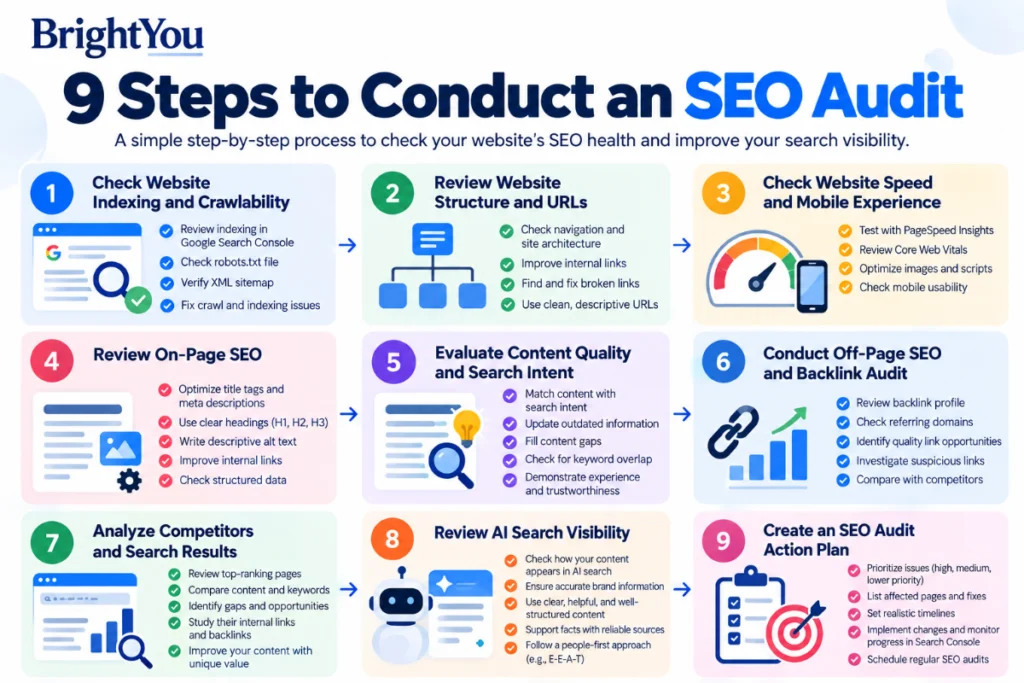
Step 1: Check Website Indexing and Crawlability
Before reviewing individual SEO elements, make sure search engines can access your important pages.
Google generally needs to crawl and index a page before it can appear in its search results. However, not every crawled page will be indexed, and indexing does not guarantee rankings.
Check indexing with Google Search Console
Open Google Search Console, select your website, and navigate to Indexing → Pages.
Review the indexed pages and investigate why other pages are not indexed.
Look for issues such as:
- Pages blocked by robots.txt.
- Pages marked with a noindex directive.
- Pages returning 404 errors.
- Redirected URLs.
- Duplicate pages with different canonical URLs.
- Important pages that Google has discovered but not indexed.
Not every excluded URL is a problem. A redirected URL or a duplicate page may be excluded intentionally. Focus on pages that should appear in search results but do not.
You can also use the URL Inspection tool to check an individual page’s indexing status and request indexing after correcting eligible issues.
For a more detailed explanation of search performance and indexing reports, read our guide to Google Search Console metrics.
Review your robots.txt file
The robots.txt file gives crawlers instructions about which parts of a website they may access.
Visit:
https://yourdomain.com/robots.txt
Replace yourdomain.com with your actual domain.
Check whether important pages or directories are accidentally blocked. Remember that robots.txt is not a reliable way to keep a page out of Google’s index. If a page should not be indexed, use an appropriate indexing control instead of relying on robots.txt alone.
Check your XML sitemap
An XML sitemap helps search engines discover URLs you want them to consider for indexing.
A WordPress sitemap may be available at:
https://yourdomain.com/wp-sitemap.xml
Your SEO plugin may use a different sitemap URL.
Make sure your sitemap contains relevant, canonical URLs and does not unnecessarily include redirected pages or URLs that should not be indexed. Submit the sitemap through Google Search Console and review its processing status.
What to fix first: If an important page is blocked from crawling, incorrectly marked noindex, or missing from your intended sitemap, investigate that issue before spending time on smaller optimizations.
Step 2: Review Website Structure and URLs
A website should be easy for visitors and search engines to navigate.
When important pages are buried deep within the website or have few relevant internal links, discovering them may become more difficult.
Check your website architecture
Review your main navigation, category pages, blog structure, and internal links.
Ask yourself:
- Can visitors reach important pages without unnecessary navigation?
- Are related blog posts connected through useful internal links?
- Do category pages help visitors understand the website’s structure?
- Are there important pages that receive few or no internal links?
The goal is to create a logical structure that makes important content easy to discover.
For example, a digital marketing website could connect an SEO audit guide to related articles about Google Search Console, technical SEO, keyword research, and Google Analytics 4.
These links help readers explore related topics and provide additional context about your website’s content.
Find broken links and unnecessary redirects
Broken links can frustrate visitors and lead them to pages that no longer exist.
A website crawler such as Screaming Frog SEO Spider can help identify broken internal links, redirect chains, and pages returning HTTP errors.
When you find a problem:
- Update links that point to incorrect URLs.
- Redirect permanently moved pages to relevant replacement pages when appropriate.
- Remove unnecessary redirect chains.
- Avoid redirecting unrelated pages to the homepage simply to eliminate errors.
Check your preferred URL version
Your website should have a consistent approach to URLs, including HTTPS and the preferred hostname.
Review whether URL versions resolve correctly and whether canonical tags point to the intended preferred URLs.
For example, if your preferred page is: For example, make sure your website uses a consistent preferred URL.
Check that alternative versions do not create unnecessary duplication and that the canonical tag points to the preferred URL.
Canonical tags are signals to search engines, not absolute guarantees. They should be consistent with redirects, internal links, and sitemap entries.
Step 3: Check Website Speed and Mobile Experience
Website performance matters because visitors expect pages to load and respond without unnecessary delays.
A slow or difficult-to-use website can frustrate users, especially when they browse on mobile devices.
Use Google PageSpeed Insights
Open Google PageSpeed Insights and enter your website URL.
Test important pages individually, such as your homepage, blog posts, and landing pages. Different pages may perform differently because they use different images, scripts, and layouts.
Review the recommendations and look for issues such as:
- Large, uncompressed images.
- Unnecessary JavaScript or CSS.
- Render-blocking resources.
- Slow server responses.
- Layout shifts during loading.
- Elements that respond slowly to user interaction.
For WordPress websites, optimizing images, reducing unnecessary plugins, and using suitable caching can help. Test changes carefully because aggressive optimization settings may affect website functionality.
Understand Core Web Vitals
Google uses three Core Web Vitals metrics to evaluate important aspects of user experience.
| Metric | What it measures | Good threshold |
|---|---|---|
| Largest Contentful Paint (LCP) | Loading performance | 2.5 seconds or less |
| Interaction to Next Paint (INP) | Responsiveness | 200 milliseconds or less |
| Cumulative Layout Shift (CLS) | Visual stability | 0.1 or less |
These thresholds are assessed at the 75th percentile of page visits rather than from a single test alone.
PageSpeed Insights provides lab data and, where available, real-user field data. Use both to understand performance. A single test can help identify issues, but it does not represent every visitor’s experience.
Check mobile usability
Open your website on a mobile phone or use browser developer tools to inspect smaller screen sizes.
Check whether:
- Text is readable without zooming.
- Menus and buttons are easy to use.
- Images fit the screen properly.
- Content does not overflow horizontally.
- Pop-ups do not obstruct important content.
- Forms are easy to complete.
A page that looks polished on a laptop may still have layout problems on a mobile screen. Fix those issues before moving on to less urgent optimizations.
Step 4: Review On-Page SEO
On-page SEO helps search engines and readers understand what each page is about.
Start with your most important pages, especially those targeting relevant search queries or already receiving impressions in Google Search Console.
Check title tags and meta descriptions
Your title tag helps search engines and readers understand the main topic of a page.
For example:
Less descriptive: SEO Tips
More descriptive: SEO Audit Checklist: How to Audit a Website Step by Step
The second title communicates the topic more clearly.
Write a useful meta description that summarizes the page and gives readers a reason to visit. Google may generate a different search snippet depending on the query, so a meta description does not guarantee that exact text will appear.
Avoid repeating the same title across multiple pages or stuffing titles with keywords.
Review headings and content structure
Use a clear H1 for the main topic, followed by logical H2 headings and H3 subheadings where needed.
For example:
- H1: How to Do an SEO Audit for a Website
- H2: Check Technical SEO
- H3: Review Your XML Sitemap
Headings should describe the content that follows. They help readers navigate the article and can help search engines understand its structure.
Check keyword placement
Your content should use language that reflects what your audience is searching for.
For an article targeting SEO audit checklist, you might naturally use related phrases such as website SEO audit, technical SEO audit, and on-page SEO audit where they fit the discussion.
Avoid repeating the same keyword in every paragraph. There is no ideal keyword density that guarantees rankings. Focus on answering the reader’s question clearly.
Optimize images
Images can make a blog post easier to understand, but poorly optimized files may slow down the page.
Review whether:
- Images are appropriately sized and compressed.
- File names describe the image where useful.
- Informative images have descriptive alt text.
- Decorative images are handled appropriately.
- Images display correctly on mobile devices.
For example, seo-audit-checklist.webp is more descriptive than IMG1234.webp for an image showing an SEO audit checklist.
Alt text should describe the image’s relevant content or purpose. Do not use it simply to insert additional keywords.
Review internal links
Internal links connect one page of your website to another. They help visitors discover related information and can help search engines find and understand your pages.
Review your articles and identify opportunities to link to relevant content.
For example, this article links to our existing Google Search Console metrics guide. You can also explore our Google Tag Manager guide to learn more about website tracking.
Use descriptive anchor text that tells readers what to expect from the linked page. Add links only where they genuinely support the discussion.
Review structured data
Structured data provides search engines with additional information about a page.
Depending on the content, relevant schema types may include Article, Organization, or BreadcrumbList. Product schema is appropriate for qualifying product pages.
Use Google’s Rich Results Test to check supported rich-result markup. Make sure the structured data accurately reflects the visible page content.
Adding schema does not guarantee enhanced search results, so use it to describe your content accurately rather than as a shortcut to higher rankings.
Step 5: Evaluate Content Quality and Search Intent
A technically sound website can still struggle if its content does not answer the questions people are asking.
During a content audit, examine whether each important page offers useful information, matches the likely search intent, and contributes something distinct to your website.
Compare your content with search intent
Search for your target query and review the types of results Google displays.
For example, someone searching for “how to do an SEO audit” is likely looking for a practical process, not simply a definition of SEO.
Your article should explain the steps, introduce suitable tools, show how to interpret findings, and help readers decide what to fix first.
Do not copy competing articles. Use the results to understand what readers expect and identify opportunities to explain the subject more clearly.
Identify content gaps
Review your existing articles and look for useful questions that have not been answered.
For example, an SEO audit guide might benefit from explaining how to:
- Check indexing in Google Search Console.
- Identify broken links.
- Review Core Web Vitals.
- Find missing title tags.
- Prioritize technical issues.
- Turn audit findings into an action plan.
Only add sections that genuinely help readers. A longer article is not automatically a better article.
Look for keyword cannibalization
Keyword cannibalization can occur when multiple pages target very similar search intent and compete to satisfy the same query.
Use Google Search Console to examine the queries associated with your pages. If several URLs appear for the same query, review whether they serve different purposes or whether one page could provide a clearer, more comprehensive answer.
Do not automatically merge pages simply because they share a keyword. Different pages may legitimately target related terms when their purposes differ.
Demonstrate experience and trustworthiness
Google’s guidance emphasizes helpful, reliable, people-first content.
You can strengthen an SEO audit article by including:
- Original screenshots from tools you have used.
- Clear explanations of what each metric means.
- Practical examples of identifying and fixing an issue.
- Links to relevant official documentation.
- Accurate information about what tools can and cannot tell you.
- An appropriate author profile and transparent website information.
E-E-A-T stands for Experience, Expertise, Authoritativeness, and Trustworthiness. It is a useful framework for thinking about content quality, not a single score you can optimize to guarantee rankings.
Step 6: Conduct an Off-Page SEO and Backlink Audit
Backlinks are links from other websites to your pages. They can help search engines discover content and may contribute to understanding a page’s relevance and reputation.
However, not every backlink is valuable, and a large backlink count does not automatically mean a website will rank well.
Review your backlink profile
Use available tools to examine referring domains, linking pages, and the context in which other websites link to you.
Google Search Console’s Links report provides a sample of links associated with your website. Other backlink tools can offer additional information, depending on their databases and subscription limits.
Look for:
- Relevant websites linking to useful content.
- Broken pages that previously attracted links.
- Opportunities to earn links through original resources.
- Unusual patterns that may require closer investigation.
Do not assume that every unfamiliar or low-quality-looking link is harmful. Google generally works to assess links automatically, and disavowing links is an advanced action intended for specific situations, not routine maintenance.
Compare your website with competitors
Review relevant competing pages to understand what useful resources they offer and which topics they cover.
You might discover opportunities to create a more helpful checklist, publish an original example, improve a tutorial, or contribute expert information to relevant industry publications.
Focus on earning relevant links through useful content and legitimate outreach rather than buying links intended to manipulate rankings.
Step 7: Analyze Competitors and Search Results
Competitor analysis helps you understand the content and resources available to people searching for your target topics.
Choose a few websites that compete with you for similar search queries. They do not necessarily need to sell the same products or services; what matters is whether their pages compete for the same audience and search intent.
Compare:
- Topics and keywords their pages cover.
- The depth and usefulness of their explanations.
- Their internal linking structure.
- Relevant referring domains and backlinks.
- Search result features appearing for your target queries.
Look for gaps you can address with original, useful information.
For example, if competing SEO audit guides list tools but do not explain how to prioritize findings, you could make your article more actionable by including a simple priority system.
Do not copy a competitor’s structure simply because their page ranks well. Your goal is to provide a clearer and more useful answer to the reader’s problem.
Step 8: Review AI Search Visibility
People may discover information through AI-generated summaries and conversational search experiences in addition to traditional search results.
An SEO audit can include a review of how clearly your brand, website, and content communicate reliable information.
Consider these checks:
- Are your important pages accessible to the search crawlers you intend to allow?
- Is your brand information accurate and consistent?
- Do your articles explain topics clearly and support factual claims?
- Are important claims supported by trustworthy sources?
- Can visitors easily identify your website, authors, and relevant contact information?
You may also review whether your brand appears accurately in relevant AI-generated answers. Treat these checks as supplementary visibility and quality reviews, not as a guaranteed method of appearing in AI answers.
Do not block or allow crawlers indiscriminately. Review the purpose of each crawler and your website’s preferences before changing access rules.
Step 9: Create an SEO Audit Action Plan
After completing your audit, you may have a long list of issues. Trying to fix everything at once can waste time, especially when you manage a small website.
A practical approach is to group findings into three levels.
High priority: Issues preventing important pages from being crawled or indexed, widespread server errors, incorrect canonical settings, or serious usability problems.
Medium priority: Missing or duplicated metadata, weak internal linking, relevant content gaps, and performance improvements that meaningfully affect user experience.
Lower priority: Minor wording improvements, small formatting inconsistencies, and changes with limited expected impact.
These categories are a starting point, not universal rules. A problem affecting one critical landing page may deserve more attention than an issue affecting several unimportant URLs.
Create a simple action plan with the issue, affected page, proposed fix, priority, and status. After implementing changes, monitor relevant reports and allow time for search engines to recrawl pages and for performance data to accumulate.
Free Tools You Can Use for an SEO Audit
You can complete many important audit tasks without purchasing a paid SEO platform.
| Tool | What it helps you check |
|---|---|
| Google Search Console | Search performance, indexing, and sitemap status |
| Google PageSpeed Insights | Page performance and Core Web Vitals |
| Screaming Frog SEO Spider | Website crawling, broken links, and metadata; free version has limits |
| Google Rich Results Test | Checks supported structured data for rich-result eligibility |
| Google Keyword Planner | Keyword ideas and estimated search demand |
| Google Trends | Changes in search interest and related topics |
| Google Analytics 4 | Website activity and user interactions |
| Bing Webmaster Tools | Search performance and site diagnostics for Bing |
Some tools have usage limits or paid features. You can start with Google Search Console and PageSpeed Insights, then add a crawler or other tools when your needs grow.
SEO Audit Checklist: What to Check Before You Finish
Use this checklist to review the most important parts of your website.
Technical SEO
- Important pages can be crawled and are eligible for indexing.
- Robots.txt rules do not unintentionally block important pages.
- XML sitemaps contain appropriate canonical URLs.
- Broken links and server errors have been investigated.
- Canonical tags and redirects are configured consistently.
- The preferred HTTPS version of the website works correctly.
Website performance
- Important pages have been tested with PageSpeed Insights.
- Core Web Vitals have been reviewed where field data is available.
- Images are appropriately sized and compressed.
- The mobile layout is usable and readable.
- Unnecessary scripts and performance bottlenecks have been reviewed.
On-page SEO and content
- Important pages have descriptive title tags and meta descriptions.
- Headings reflect the actual content.
- Images have appropriate alternative text.
- Internal links connect related pages.
- Content matches search intent and answers useful questions.
- Competing pages have been reviewed for overlapping search intent.
- Relevant structured data has been checked.
Off-page SEO and visibility
- Backlinks and referring domains have been reviewed.
- Relevant competitor content and link opportunities have been assessed.
- Important brand and business information is accurate.
- Search performance is monitored through Google Search Console.
Not every item needs to be changed. The checklist helps you identify what needs attention and distinguish real problems from normal website behaviour.
Conclusion
An SEO audit gives you a clearer understanding of what is working on your website and what needs improvement. By checking technical SEO, website performance, on-page elements, content quality, backlinks, and search visibility, you can build a more organized approach to optimization.
You do not need to fix every issue in one day. Start with problems that prevent important pages from being discovered or used properly, then move on to content improvements and longer-term opportunities.
Most importantly, treat an SEO audit as an ongoing process rather than a one-time task. Review your website regularly, measure the results of meaningful changes, and keep improving the experience you provide to visitors.
A well-maintained website is not just about search rankings. It is about making useful information easier to discover, understand, and use.
Ready to review your website? Start with Google Search Console and PageSpeed Insights, work through the checklist above, and turn your findings into a realistic action plan.