
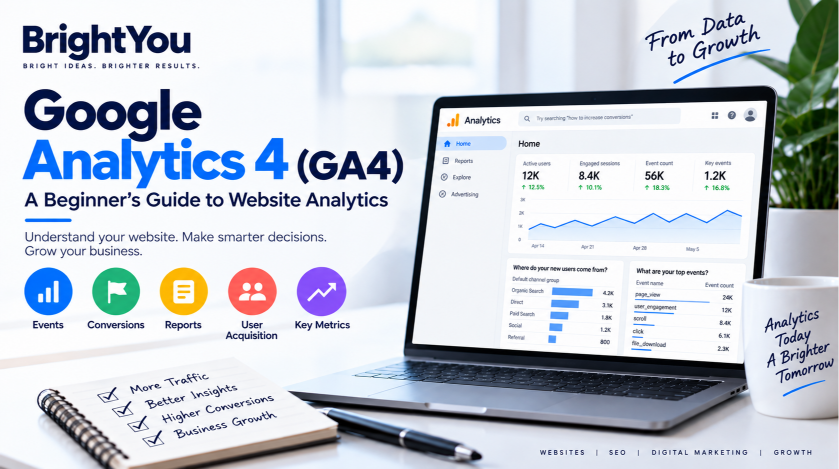
Understanding what visitors do on your website is essential for making better digital marketing decisions. Google Analytics 4 (GA4) helps you understand how people find your website, what they do after arriving, and which actions contribute to your business goals.
Google officially retired Universal Analytics on July 1, 2024, making GA4 the standard platform for measuring website and app performance. Unlike Universal Analytics, GA4 uses an event-based approach to understand user interactions.
For beginners, GA4 can seem complicated at first. But once you understand its core concepts—such as data streams, events, key events, reports, and metrics—it becomes much easier to use.
In this guide, we’ll explain Google Analytics 4 in simple terms and show how it can support website analysis, SEO, and digital marketing.
What Is Google Analytics 4?
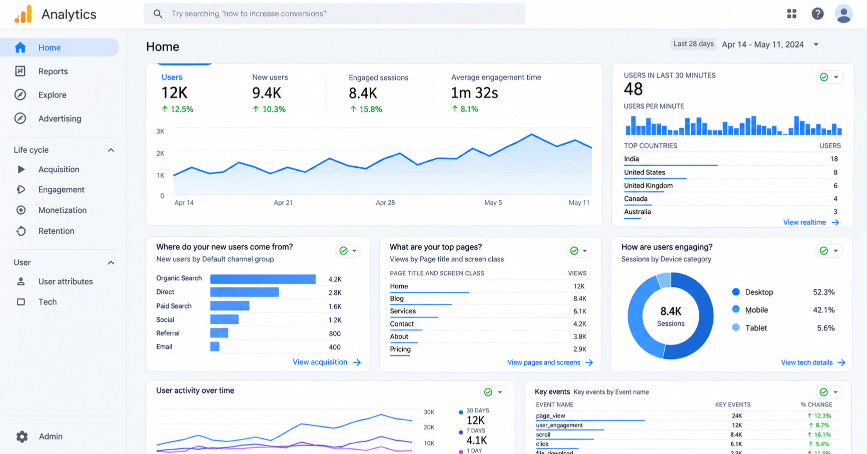
Google Analytics 4 (GA4) is Google’s analytics platform for measuring user behavior across websites and mobile apps. It provides a unified way to understand how people interact with digital platforms.
One of the biggest differences between GA4 and Universal Analytics is how data is collected.
Universal Analytics was primarily session-based, while GA4 uses an event-based model. This means individual user interactions are recorded as events.
For example, when someone:
- Visits a page
- Clicks a button
- Plays a video
- Downloads a file
- Completes a purchase
these interactions can be recorded as events in GA4.
This event-based approach gives marketers a more detailed view of how users interact with a website.
Learn more: Google Analytics Help
Why Is GA4 Important for Digital Marketing?
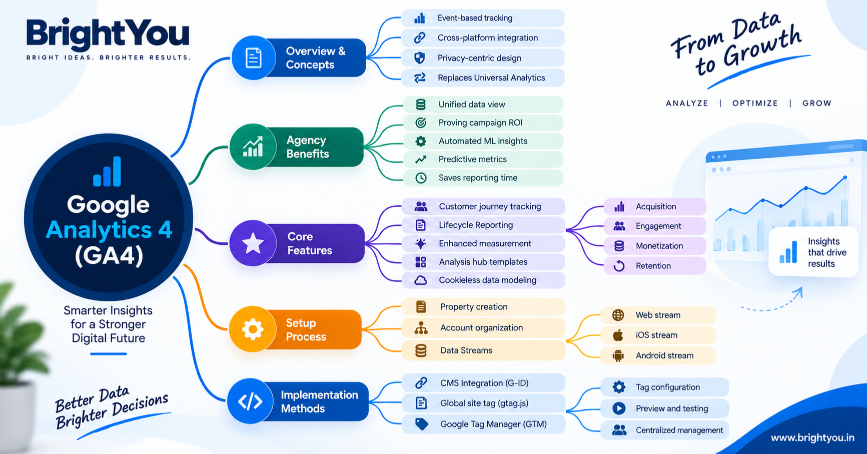
GA4 is useful because it helps marketers understand what happens after people arrive on a website.
1. Cross-Platform Tracking
GA4 can bring website and app data together through different data streams, making it easier to understand user activity across multiple platforms.
2. Privacy-Focused Measurement
GA4 was designed for an environment where privacy and user consent are increasingly important. It can use measurement and modeling approaches to address certain data gaps.
3. Machine Learning Insights
GA4 uses machine learning capabilities to identify trends and provide predictive insights that can support marketing analysis.
4. Google Ads Integration
GA4 can work with Google Ads and other marketing channels, helping marketers connect website activity with advertising campaigns and audience strategies.
How Does GA4 Work?
To understand GA4 website tracking, it helps to know three basic concepts: data streams, Measurement IDs, and user identification.
Data Streams
Unlike Universal Analytics, GA4 does not use reporting Views. Instead, data is collected through Data Streams.
GA4 supports:
- Web
- iOS
- Android
For a website, the web data stream receives a unique Measurement ID, usually beginning with G-. This connects website activity to your GA4 property.
User Identification
GA4 can use different identity spaces to help understand users across devices, including:
- User ID
- Google Signals
- Device ID
These methods provide a broader view of audience activity.
GA4 vs Universal Analytics
The biggest difference between the two platforms is their data model.
| Universal Analytics | Google Analytics 4 |
|---|---|
| Primarily session-based | Event-based |
| Used Views | Uses Data Streams |
| Older reporting structure | Customer-journey-focused reporting |
| Goals | Key events and conversion measurement |
| Separate web and app measurement | Web and app data can be brought together |
Because the two platforms use different measurement approaches, historical Universal Analytics numbers should not be expected to match GA4 numbers exactly.
How to Set Up GA4
A basic GA4 setup involves creating a property and connecting your website through a web data stream.
Once the data stream is created, you receive a Measurement ID that connects your website to GA4.
You can implement GA4 directly on your website or use Google Tag Manager (GTM) for more flexible tracking management.
Official resource: Set up Google Analytics
Understanding GA4 Events
GA4 events are one of the most important concepts to understand because they form the foundation of GA4 reporting. Every interaction is recorded as an event.
1. Automatically Collected Events
These are collected automatically when the basic GA4 implementation is in place.
Examples include:
first_visitsession_startuser_engagement
2. Enhanced Measurement Events
Enhanced Measurement can automatically track several website interactions without additional coding.
Examples include:
- Scrolls
- Outbound clicks
- Site search
- Video engagement
- File downloads
3. Recommended Events
Google provides recommended event names and structures for specific types of businesses and interactions.
For example, purchase can be used for e-commerce activity, while generate_lead can be used for lead-generation activities.
4. Custom Events
Custom events can be created when a specific business interaction does not fit an existing event structure.
Understanding these event types makes it easier to organize your GA4 website tracking.
What Are Key Events and Conversions in GA4?
Some user actions are more valuable to a business than others.
For example, a website might consider these important actions:
- Submitting a contact form
- Completing a purchase
- Generating a lead
- Completing another important business action
GA4 allows important events to be identified as key events, while conversion-related measurement can also be used in advertising and reporting workflows.
Tracking these important actions helps marketers understand whether their campaigns are generating meaningful results instead of simply bringing visitors to a website.
Important GA4 Reports
GA4 provides different reports for understanding various parts of the customer journey.
Acquisition Reports
Acquisition reports help you understand where users come from.
You can examine sources such as:
- Organic search
- Social media
- Paid campaigns
- Other traffic sources
GA4 distinguishes between User Acquisition and Traffic Acquisition, helping marketers understand both new-user discovery and session-level traffic sources.
Engagement Reports
Engagement reports help you understand what users do after reaching your website.
You can use them to examine pages, articles, events, and other interactions.
Monetization Reports
For businesses that sell products or services online, monetization reports provide information about revenue, purchases, and the checkout journey.
Retention Reports
Retention reports help you understand whether users return to your website or app over time.
Explore
The Explore section provides additional analysis options, including funnel exploration, path analysis, and audience comparisons.
Important Google Analytics 4 Metrics to Track
GA4 provides many metrics, but beginners can start with a few important ones.
Active Users
Active Users represent users who meet GA4’s criteria for active engagement.
Engagement Rate
Engagement Rate helps show how many sessions were engaged. A session can qualify as engaged when it lasts longer than 10 seconds, includes a key event, or includes multiple page or screen views.
Average Engagement Time
This metric helps you understand how long your website or app remained active in the user’s foreground.
Looking at these metrics together gives you a better understanding of whether your website is attracting and engaging visitors.
How GA4 Helps with SEO and Digital Marketing
GA4 is particularly useful for marketers because it goes beyond showing how much traffic a website receives.
Connect Search Data With Website Behavior
Connecting Google Search Console with GA4 can help marketers understand what happens after users arrive from organic search.
This allows you to analyze search-related information alongside website engagement and conversion activity.
If you want to learn more about improving organic search performance, see our Google Search Console SEO guide.
Understand the Customer Journey
A customer may discover a business through Google, return through social media, and eventually convert through another marketing channel.
GA4 can help marketers understand activity across different channels and touchpoints.
Support Local SEO Analysis
For businesses that depend on local customers, GA4 can be used alongside Google Business Profile optimization to understand how local search visibility contributes to website activity.
Read our Google Business Profile SEO guide to learn more about improving local search visibility.
Build Audiences
GA4’s audience and predictive capabilities can also support audience strategies for advertising platforms.
For digital marketers, this means GA4 can be useful not only for reporting but also for making more informed marketing decisions.
GA4 and Google Tag Manager
Google Tag Manager (GTM) is a useful tool for managing tracking implementations.
Instead of repeatedly modifying website code, marketers can use GTM to manage tags from one interface. GTM also provides preview and debugging features that help verify whether tracking is working correctly.
A Basic GTM + GA4 Workflow
- Find your GA4 Measurement ID.
- Create the appropriate Google tag in Google Tag Manager.
- Add the Measurement ID.
- Configure the triggering conditions.
- Use Preview mode to test the implementation.
- Publish after verifying that the tracking works correctly.
Official resource: Google Tag Manager
Common GA4 Mistakes Beginners Should Avoid
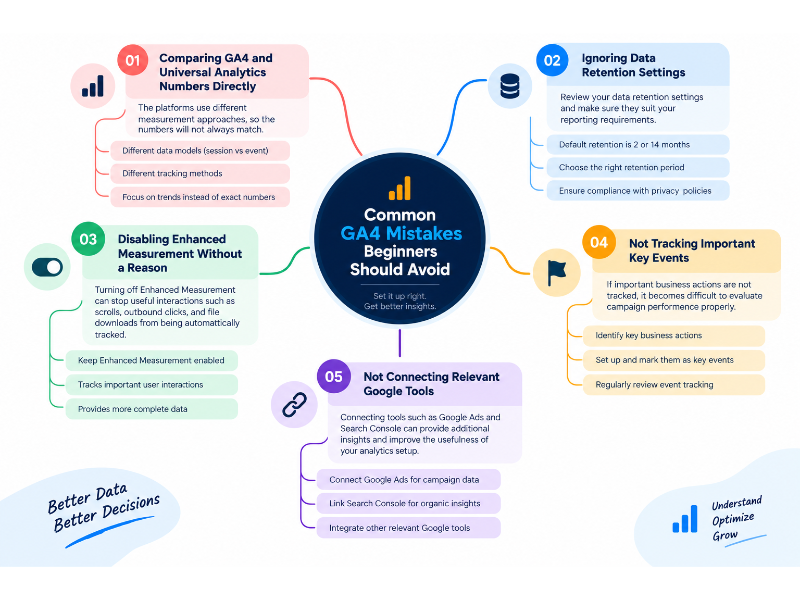
GA4 becomes much more useful when the underlying setup is accurate. Beginners should avoid these common mistakes.
1. Comparing GA4 and Universal Analytics Numbers Directly
The platforms use different measurement approaches, so the numbers will not always match.
2. Ignoring Data Retention Settings
Review your data retention settings and make sure they suit your reporting requirements.
3. Disabling Enhanced Measurement Without a Reason
Turning off Enhanced Measurement can stop useful interactions such as scrolls, outbound clicks, and file downloads from being automatically tracked.
4. Not Tracking Important Key Events
If important business actions are not tracked, it becomes difficult to evaluate campaign performance properly.
5. Not Connecting Relevant Google Tools
Connecting tools such as Google Ads and Search Console can provide additional insights and improve the usefulness of your analytics setup.
Conclusion
Google Analytics 4 can seem overwhelming when you first open the platform, but understanding its core concepts makes it much easier to work with.
Start with the basics: set up your data stream, understand GA4 events, identify important key events, and learn how to read Acquisition and Engagement reports.
Once you become comfortable with these areas, you can move into more advanced analysis, audience building, Google Ads integration, and customer-journey reporting.
For digital marketers, GA4 is more than a traffic-reporting tool. Used correctly, it can help connect website activity with marketing performance and provide valuable insights for future decisions.
FAQs
Is Universal Analytics completely gone?
Universal Analytics was officially turned off on July 1, 2024. Google Analytics 4 is now the standard Google Analytics platform for website and app measurement.
How does GA4 track visitors without third-party cookies?
GA4 can use first-party cookies along with other measurement and modeling approaches to help address gaps in data collection. The measurement available can depend on factors such as user consent and implementation.
Can I manage multiple websites in one GA4 account?
Yes. A Google Analytics account can contain multiple GA4 properties, and properties can contain multiple web and app data streams.
Do I need coding experience to set up GA4 events?
Not necessarily. Enhanced Measurement can automatically track several website interactions, while tools such as Google Tag Manager can help marketers manage additional tracking implementations.